Tác giả: Sarath Kumar Kallayil Sreedharan, Bruno Giorgini, and Nideesh K T
Ngày phát hành: 07 JAN 2026
Chuyên mục: AWS End User Messaging, Intermediate (200), Messaging
AWS End User Messaging cho phép gửi SMS, MMS, thông báo đẩy (push notifications), tin nhắn WhatsApp và chuyển văn bản thành giọng nói trên toàn cầu. Khi bạn gửi tin nhắn SMS, MMS và tin nhắn thoại bằng AWS End User Messaging, bạn phải sử dụng một định danh gốc cụ thể hỗ trợ việc gửi các tin nhắn này. Các tùy chọn nhắn tin khác nhau tùy theo quốc gia và bao gồm số điện thoại miễn phí (TFN), mã dài 10 chữ số (US 10DLC), mã dài (long codes), mã ngắn (short codes) và ID người gửi (sender IDs). Để kiểm tra các tùy chọn có sẵn của một quốc gia, hãy tham khảo Các quốc gia và khu vực được hỗ trợ cho tin nhắn SMS với AWS End User Messaging SMS.
Bài viết này giải thích cách đăng ký ID người gửi theo chương trình, có thể được sử dụng ở nhiều quốc gia trên thế giới. Quá trình đăng ký cho phép các doanh nghiệp và tổ chức gửi tin nhắn bằng một định danh chữ và số thay vì số điện thoại, giúp việc liên lạc trở nên chuyên nghiệp và dễ nhận biết hơn đối với người nhận. Ví dụ, một công ty hư cấu Example Corp có thể sử dụng ID người gửi EXAMPLECO để gửi SMS. Để tìm hiểu thêm về đăng ký ID người gửi, hãy tham khảo ID người gửi trong AWS End User Messaging SMS.
Bài viết này khám phá các API của AWS End User Messaging cần thiết để đăng ký ID người gửi theo chương trình cho Indonesia và Ấn Độ. Các tập lệnh mẫu này đóng vai trò là tài liệu tham khảo cho việc đăng ký ID người gửi ở các quốc gia khác. Phương pháp tự động hóa này đơn giản hóa quy trình đăng ký, tiết kiệm thời gian và công sức cho các doanh nghiệp sử dụng AWS End User Messaging cho nhu cầu liên lạc của họ.
Các API của AWS End User Messaging để đăng ký ID người gửi
API AWS End User Messaging V2 chứa một tập hợp các hành động tập trung vào quản lý đăng ký ID người gửi:
- DescribeRegistrationTypeDefinitions – Truy xuất chi tiết loại đăng ký cho các quốc gia khác nhau. Bạn có thể sử dụng
DescribeRegistrationFieldDefinitionsđể xem các yêu cầu để tạo, điền và gửi từng loại đăng ký. - CreateRegistration – Tạo một đăng ký mới. Trường
RegistrationTypekiểm soát xem đây là đăng ký cho số điện thoại miễn phí, 10DLC hay ID người gửi. Bài viết này sẽ sử dụng ID người gửi. - DescribeRegistrationFieldDefinitions – Truy xuất các yêu cầu trường cho một loại đăng ký cụ thể (được truy xuất bởi
DescribeRegistrationTypeDefinitions). - PutRegistrationFieldValue – Hành động này phải được lặp lại cho tất cả các trường bắt buộc (được truy xuất bởi
DescribeRegistrationFieldDefinitions). - CreateRegistrationAttachment – Tải lên một tệp đính kèm bắt buộc (ví dụ: thư ủy quyền) để đăng ký dựa trên các yêu cầu cụ thể của quốc gia.
- SubmitRegistrationVersion – Gửi đăng ký đã chỉ định để xem xét và phê duyệt. Đảm bảo xác minh tất cả dữ liệu là chính xác trước khi gửi đăng ký. Quá trình xem xét bao gồm các bước sau:
- Sau khi tập lệnh của bạn gửi đăng ký, trạng thái ban đầu xuất hiện là
CREATEDvà thường thay đổi thànhREVIEWINGtrong vòng 24 giờ. - Sau khi gửi, đăng ký ID người gửi của bạn không thể được sửa đổi hoặc xóa cho đến khi cơ quan đăng ký bên thứ ba hoàn tất quá trình xem xét của họ.
- Nếu trạng thái vẫn là
CREATEDtrong hơn 24 giờ sau khi bạn đã gửi đăng ký, hãy mở một trường hợp hỗ trợ để được trợ giúp.
- Sau khi tập lệnh của bạn gửi đăng ký, trạng thái ban đầu xuất hiện là
Các hành động có sẵn để đăng ký ID người gửi
Khi bạn quản lý các chiến dịch nhắn tin của mình trong AWS End User Messaging SMS, một số API có sẵn để giúp bạn xử lý đăng ký ID người gửi một cách hiệu quả:
- CreateRegistrationVersion – Tạo một phiên bản mới của đăng ký và tăng
VersionNumber. Phiên bản trước của đăng ký trở thành chỉ đọc. Điều này hữu ích cho việc cập nhật thông tin đăng ký trong khi vẫn duy trì các bản ghi lịch sử. - DescribeRegistrationAttachments – Truy xuất các tệp đính kèm đăng ký đã chỉ định hoặc tất cả các tệp đính kèm đăng ký liên quan đến tài khoản AWS của bạn. Điều này giúp quản lý và xem xét các tài liệu được liên kết với đăng ký của bạn.
- DescribeRegistrationFieldValues – Truy xuất các giá trị trường đăng ký đã chỉ định. Bạn có thể sử dụng API này để xem xét chi tiết đăng ký hiện tại cho một phiên bản cụ thể.
- DescribeRegistrations – Truy xuất các đăng ký đã chỉ định và cung cấp tổng quan về tất cả các đăng ký ID người gửi của bạn, điều này hữu ích cho việc quản lý nhiều chiến dịch.
- DescribeRegistrationSectionDefinitions – Truy xuất các định nghĩa phần đăng ký đã chỉ định. Bạn có thể sử dụng
DescribeRegistrationSectionDefinitionsđể xem các yêu cầu để tạo, điền và gửi từng loại đăng ký. API này giúp bạn hiểu cấu trúc và yêu cầu của các phần đăng ký khác nhau. - DescribeRegistrationVersions – Truy xuất phiên bản đăng ký đã chỉ định. Bạn có thể sử dụng API này để theo dõi các thay đổi và xem các phiên bản lịch sử của một đăng ký.
Sau đây là những cân nhắc quan trọng cho việc đăng ký:
- Hầu hết các hồ sơ đăng ký đều được xem xét bởi một tổ chức bên thứ ba độc lập. Đây là một thực tiễn tiêu chuẩn trong ngành giữa các nhà cung cấp SMS.
- AWS không xem xét các đăng ký của bạn. Điều quan trọng là phải hoàn thành quá trình đăng ký này với sự hiểu biết rằng AWS chỉ đơn thuần tạo điều kiện cho quá trình gửi. AWS không tham gia hoặc ảnh hưởng đến quá trình xem xét của bên thứ ba.
- Mỗi quốc gia có quy trình và thời gian xem xét riêng. Mỗi đăng ký được kiểm tra theo nguyên tắc “đến trước, phục vụ trước” bởi cơ quan đăng ký của mỗi quốc gia. Việc xem xét đăng ký được thực hiện bởi nhân viên bên ngoài không quen thuộc với công ty hoặc trường hợp sử dụng của bạn. Do đó, điều quan trọng là phải cung cấp các phản hồi rõ ràng và súc tích trong đơn đăng ký của bạn.
- Sau khi gửi đăng ký, trạng thái bắt đầu là
CREATEDvà thường chuyển sangREVIEWINGtrong vòng 24 giờ. - Nếu AWS có thể cung cấp cho bạn một ID người gửi, AWS sẽ gửi cho bạn một khung thời gian ước tính cần thiết để cấp phép. Ở nhiều quốc gia, AWS có thể cung cấp cho bạn một ID người gửi trong vòng 2–4 tuần. Tuy nhiên, ở một số quốc gia, có thể mất vài tuần để có được một ID người gửi.
Luồng sử dụng API của AWS End User Messaging để đăng ký ID người gửi
Luồng API bao gồm các bước sau:
- Gọi DescribeRegistrationTypeDefinitions để hiểu các loại đăng ký có sẵn.
- Sử dụng CreateRegistration để bắt đầu quá trình đăng ký.
- Để lấy chi tiết về các trường bắt buộc, hãy gọi DescribeRegistrationFieldDefinitions.
- Sử dụng PutRegistrationFieldValue nhiều lần để điền tất cả các trường bắt buộc.
- Nếu cần, hãy sử dụng CreateRegistrationAttachment để tải lên các tài liệu hỗ trợ.
- Cuối cùng, gọi SubmitRegistrationVersion để gửi đăng ký để xem xét.
- Sử dụng DescribeRegistrations định kỳ để kiểm tra trạng thái của đăng ký.
Luồng API này cho phép một quy trình đăng ký ID người gửi hoàn toàn tự động cho các quốc gia được hỗ trợ. Các doanh nghiệp có thể quản lý đăng ký hiệu quả trên các môi trường pháp lý và địa điểm địa lý khác nhau.
Định dạng trường đăng ký
API AWS End User Messaging sử dụng một định dạng cụ thể để định nghĩa các trường đăng ký:
- SectionPath – Đại diện cho vị trí phân cấp của một trường trong cấu trúc biểu mẫu đăng ký. Ví dụ:
"SectionPath": "companyInfo". - FieldPath – Đường dẫn đầy đủ đến một trường cụ thể, kết hợp
SectionPathvới tên trường. Ví dụ:"FieldPath": "companyInfo.companyName". - FieldType – Chỉ định kiểu dữ liệu của trường (chẳng hạn như
TEXT,SELECThoặcATTACHMENT). Ví dụ:"FieldType": "TEXT". - FieldRequirement – Cho biết trường là
REQUIRED(bắt buộc),OPTIONAL(tùy chọn) hoặcCONDITIONAL(có điều kiện). Ví dụ:"FieldRequirement": "REQUIRED".
Hiểu các thuộc tính này là rất quan trọng để tương tác API hiệu quả trong quá trình đăng ký. Chúng định nghĩa cả cấu trúc các lệnh gọi API của bạn và các đầu vào dữ liệu cần thiết.
Đoạn mã sau là một tập hợp con của phản hồi từ DescribeRegistrationFieldDefinitions cho loại đăng ký của Vương quốc Anh (RegistrationType):
{
            "SectionPath": "companyInfo",
            "FieldPath": "companyInfo.companyName",
            "FieldType": "TEXT",
            "FieldRequirement": "REQUIRED",
            "TextValidation": {
                "MinLength": 1,
                "MaxLength": 100,
                "Pattern": "^(?=\\s*\\S)[\\s\\S]+$"
            },
            "DisplayHints": {
                "Title": "Company name",
                "ShortDescription": "Legal name which your company is registered under.",
                "ExampleTextValue": "Example Corp"
            }
        }

     {
            "SectionPath": "senderIdInfo",
"FieldPath": "senderIdInfo.senderIdDescription",
            "FieldType": "TEXT",
            "FieldRequirement": "OPTIONAL",
            "TextValidation": {
                "MinLength": 1,
                "MaxLength": 500,
                "Pattern": "^(?=\\s*\\S)[\\s\\S]+$"
            },
            "DisplayHints": {
                "Title": "Sender ID description",
                "ShortDescription": "If it is not obvious, explain the connection between your company name and this sender ID."
            }
        }

        {
            "SectionPath": "senderIdInfo",
            "FieldPath": "senderIdInfo.letterOfAuthorization",
            "FieldType": "ATTACHMENT",
            "FieldRequirement": "CONDITIONAL",
            "DisplayHints": {
                "Title": "Letter of authorization image",
                "ShortDescription": "Image of your signed letter of authorization (LOA)"
            }
        }
        {
            "SectionPath": "messagingUseCase",
            "FieldPath": "messagingUseCase.monthlyMessageVolume",
            "FieldType": "SELECT",
            "FieldRequirement": "REQUIRED",
            "SelectValidation": {
                "MinChoices": 1,
                "MaxChoices": 1,
                "Options": [
                    "10",
                    "100",
                    "1,000",
                    "10,000",
                    "100,000",
                    "250,000",
                    "500,000",
                    "750,000",
                    "1,000,000",
                    "5,000,000",
                    "10,000,000+"
                ]
            },
            "DisplayHints": {
                "Title": "Monthly SMS volume",
                "ShortDescription": "Estimated number of SMS messages which will be sent from this sender ID each month."
            }
        }
Điều kiện tiên quyết
Trước khi chạy bất kỳ tập lệnh nào, bạn phải có những điều sau:
- Một tài khoản AWS có quyền sử dụng hoặc cấp phép dịch vụ AWS End User Messaging trong AWS Region mục tiêu.
- Thông tin cần thiết để đăng ký ID người gửi dựa trên quốc gia từ API DescribeRegistrationFieldDefinitions.
Tự động hóa đăng ký ID người gửi cho Indonesia
Quy trình đăng ký ở Indonesia bao gồm một số yêu cầu bổ sung khác nhau tùy thuộc vào vị trí và loại hình kinh doanh của công ty bạn. Tất cả các công ty phải nộp Thư ủy quyền (LOA) của XL Axiata. Các công ty Indonesia cần thêm LOA từ Telkomsel, IOH và Smartfren, cùng với các tài liệu NIB và NPWP. Áp dụng IDR9K và con dấu công ty cho mỗi LOA. Để biết các tài liệu mẫu, hãy tham khảo Đăng ký ID người gửi ở Indonesia trong AWS End User Messaging SMS. Các doanh nghiệp hoạt động trong lĩnh vực cho vay tiền được yêu cầu cung cấp giấy phép hoạt động do Cơ quan Dịch vụ Tài chính (Otoritas Jasa Keuangan—OJK) cấp.
Trong phần này, chúng tôi sẽ phân tích tập lệnh Python để đăng ký ở Indonesia.
Trước khi chạy tập lệnh đăng ký, bạn phải đặt các biến cần thiết với dữ liệu thực tế của công ty bạn. Sau đây là một tệp mẫu với các biến cần thiết để đăng ký ID người gửi cục bộ ở Indonesia. Cung cấp đường dẫn chính xác cho các tệp LOA (telkomsel_loa.png, ioh_loa.png, xl_axiata_loa.png, smartfren_loa.png, regulatory_licence.png, proof_of_sender_id.png, nomor_pokokWajib_pajak_document.png, và nomor_induk_berusaha_document.png).
Lưu tệp sau dưới dạng indonesia_config.py:
# =============================================================================
# INDONESIA SENDER ID REGISTRATION CONFIGURATION
# =============================================================================
#AWS Region Details
# ---------------------
REGION_NAME='us-west-2'
# Registration Settings
# ---------------------
REGISTRATION_TYPE = 'ID_SENDER_ID_REGISTRATION'  # Registration type for Indonesia
REGISTRATION_NAME = 'INDONESIA_TEST_SENDER_ID'    # Name tag for this registration
# Sender ID Information
# --------------------
# The sender ID to register. Must be between 3 and 11 alphanumeric characters.
# Must contain at least one letter. Example: 'EXAMPLE'
SENDER_ID = 'DEMO'
# Company Information
# ------------------
# Legal name of your company
COMPANY_NAME = 'Example Corp'
# Legal identification number of your company (such as EIN or VAT)
# Must be alphanumeric, 1-30 characters
COMPANY_ID = '123456789'
# Full URL of your company's website
COMPANY_WEBSITE = 'https://www.example.com'
# Select the vertical which most closely aligns with your company's area of business
# Options: Agriculture, Communication, Construction, Education, Energy, Entertainment,
# Financial, Government, Healthcare, Hospitality, Insurance, Manufacturing,
# Real estate, Retail, Technology, Other
AREA_OF_BUSINESS = ['Other']
# Company Address
# ---------------
# Physical street address associated with your company
COMPANY_ADDRESS = '123 Main Street'
# City where the physical address is located
COMPANY_CITY = 'Jakarta'
# Two-digit ISO country code where the physical address is located
COUNTRY_CODE = 'ID'
# Contact Information
# ------------------
# Email address of your company's point of contact
CONTACT_EMAIL = 'johdoe@example.com'
# Phone number of your company's point of contact
CONTACT_PHONE = '+6281234567890'
# Messaging Use Case
# -----------------
# Description of your use case for sending SMS messages with this sender ID
USE_CASE_DESCRIPTION = 'For One Time Messages'
# Select the category which most closely aligns with your use case
# Options: One-time passcodes, Account or security alerts, Purchase or delivery notifications,
# Public service announcements, Polling and surveys, Info on demand, Promotions and marketing, Other
USE_CASE_CATEGORY = ['One-time passcodes']
# Estimated number of SMS messages which will be sent from this sender ID each month
# Options: 10, 100, 1,000, 10,000, 100,000, 1,000,000, 10,000,000+
MONTHLY_MESSAGE_VOLUME = ['10,000']
# At least one sample is required of an SMS message which will be sent from this sender ID
# Maximum 306 characters
MESSAGE_SAMPLE = 'Your OTP is XXX'
# Document Paths
# --------------
# Update these paths to point to your actual document files
DOCUMENT_PATHS = {
    # Letter of authorization for Telkomsel (CONDITIONAL - required if company is local to Indonesia)
    # Download, complete, and attach the LOA from AWS documentation
    'TELKOMSEL_LOA': 'telkomsel_loa.png',

    # Letter of authorization for IOH (CONDITIONAL - required if company is local to Indonesia)
    # Download, complete, and attach the LOA from AWS documentation
    'IOH_LOA': 'ioh_loa.png',

    # Letter of authorization for XL Axiata (REQUIRED for all companies)
    # Download, complete, and attach the LOA from AWS documentation
    'XL_AXIATA_LOA': 'xl_axiata.png',

    # Letter of authorization for Smartfren (CONDITIONAL - required if company is local to Indonesia)
    # Download, complete, and attach the LOA from AWS documentation
    'SMARTFREN_LOA': 'smartfren_loa.png',

    # Regulatory agency license (OPTIONAL - required only if company's area of business is money lending)
    # Provide operating license from OJK (Otoritas Jasa Keuangan)
    'REGULATORY_LICENSE': 'regulatory_license.png',
Lưu tệp sau dưới dạng indonesia_senderid_registration.py:
import boto3
from typing import Dict, Union, List
import logging
import importlib.util
import argparse
import time
# Set up logging
logging.basicConfig(level=logging.INFO, format='%(asctime)s - %(levelname)s - %(message)s')
logger = logging.getLogger(__name__)
def load_config(config_file):
    """Load configuration from a Python file"""
    spec = importlib.util.spec_from_file_location("config", config_file)
    config = importlib.util.module_from_spec(spec)
    spec.loader.exec_module(config)
    return config
class EndUserMessagingRegistrationIndonesia:
    def __init__(self, config):
        self.client = boto3.client('pinpoint-sms-voice-v2',region_name=config.REGION_NAME)
        self.registration_id = None
        self.config = config
        self.max_retries = 5
        self.retry_delay = 2
    def create_registration(self) -> str:
        """Create a new Sender ID registration"""
        try:
            response = self.client.create_registration(RegistrationType=self.config.REGISTRATION_TYPE,
                                                       Tags=[{'Key': 'Name', 'Value': self.config.REGISTRATION_NAME}])
            self.registration_id = response['RegistrationId']
            logger.info(f"Registration created with ID: {self.registration_id}")
            return self.registration_id
        except Exception as e:
            logger.error(f"Failed to create registration: {str(e)}")
            raise


    def create_attachment(self, file_path: str) -> str:
        """Create and upload attachments"""
        try:
            with open(file_path, 'rb') as file:
                response = self.client.create_registration_attachment(
                    AttachmentBody=file.read()
                )
            attachment_id = response['RegistrationAttachmentId']
            logger.info(f"Created attachment with ID: {attachment_id}")
            return attachment_id
        except Exception as e:
            logger.error(f"Failed to create attachment: {str(e)}")
            raise
    def wait_for_attachment(self, attachment_id: str) -> bool:
        """Wait for attachment upload to complete"""
        for attempt in range(self.max_retries):
            try:
                response = self.client.describe_registration_attachments(
                    RegistrationAttachmentIds=[attachment_id]
                )
                status = response['RegistrationAttachments'][0]['AttachmentStatus']
                if status == 'UPLOAD_COMPLETE':
                    return True
                logger.info(f"Attachment status: {status}, waiting...")
                time.sleep(self.retry_delay)
            except Exception as e:
                logger.error(f"Error checking attachment status: {str(e)}")
                time.sleep(self.retry_delay)
        return False
def update_registration_fields(self, fields: Dict[str, Union[str, List[str], Dict[str, str]]]):
        """Update registration fields with provided values"""
        if not self.registration_id:
            raise ValueError("Registration ID not set. Create registration first.")
        for field_path, value in fields.items():
            try:
                if isinstance(value, dict) and 'attachmentId' in value:
                    self.client.put_registration_field_value(
                        RegistrationId=self.registration_id,
                        FieldPath=field_path,
                        RegistrationAttachmentId=value['attachmentId']
                    )
                elif isinstance(value, list):
                    self.client.put_registration_field_value(
                        RegistrationId=self.registration_id,
                        FieldPath=field_path,
                        SelectChoices=value
                    )
                else:
                    self.client.put_registration_field_value(
                        RegistrationId=self.registration_id,
                        FieldPath=field_path,
                        TextValue=value
                    )
                logger.info(f"Updated field: {field_path}")
            except Exception as e:
                logger.error(f"Failed to update field {field_path}: {str(e)}")
                raise
    def submit_registration(self):
        """Submit the registration for review"""
        if not self.registration_id:
            raise ValueError("Registration ID not set. Create registration first.")
        try:
            self.client.submit_registration_version(RegistrationId=self.registration_id)
            logger.info("Registration submitted successfully")
        except Exception as e:
            logger.error(f"Failed to submit registration: {str(e)}")
            raise
def main():
    parser = argparse.ArgumentParser(description='Indonesia SMS Registration Tool')
    parser.add_argument('--config', required=True, help='Path to config file')
    args = parser.parse_args()
  config = load_config(args.config)
    registration = EndUserMessagingRegistrationIndonesia(config)
    registration.create_registration()
    # Document mappings
    document_mapping = {
        'TELKOMSEL_LOA': 'idSidSpecificInfo.letterOfAuthorization1',
        'IOH_LOA': 'idSidSpecificInfo.letterOfAuthorization2',
        'XL_AXIATA_LOA': 'idSidSpecificInfo.letterOfAuthorization3',
        'SMARTFREN_LOA': 'idSidSpecificInfo.letterOfAuthorization4',
        'REGULATORY_LICENSE': 'idSidSpecificInfo.regulatoryAgencyLicense',
        'PROOF_OF_SENDER_ID': 'senderIdInfo.proofOfSenderIdConnection',
        'NOMOR_POKOK_WAJIB_PAJAK_Document': 'idSidSpecificInfo.nomorPokokWajibPajakDocument',
        'NOMOR_INDUK_BERUSAHA_DOCUMENT': 'idSidSpecificInfo.nomorIndukBerusahaDocument',
    }
    # Process documents
    document_fields = {}
    for doc_type, file_path in config.DOCUMENT_PATHS.items():
        try:
            attachment_id = registration.create_attachment(file_path)
            if registration.wait_for_attachment(attachment_id):
                if doc_type in document_mapping:
                    field_path = document_mapping[doc_type]
                    document_fields[field_path] = {'attachmentId': attachment_id}
                    logger.info(f"Successfully processed {doc_type}")
        except Exception as e:
            logger.error(f"Failed to process {doc_type}: {str(e)}")
            raise
    # Text fields
    text_fields = {
        'senderIdInfo.senderId': config.SENDER_ID,
        'companyInfo.companyId': config.COMPANY_ID,
        'companyInfo.companyName': config.COMPANY_NAME,
        'companyInfo.website': config.COMPANY_WEBSITE,
        'companyInfo.areaOfBusiness': config.AREA_OF_BUSINESS,
        'companyAddress.address1': config.COMPANY_ADDRESS,
        'companyAddress.city': config.COMPANY_CITY,
        'companyAddress.isoCountryCode': config.COUNTRY_CODE,
        'contactInfo.emailAddress': config.CONTACT_EMAIL,
        'contactInfo.phoneNumber': config.CONTACT_PHONE,
        'messagingUseCase.useCaseCategory': config.USE_CASE_CATEGORY,
        'messagingUseCase.useCaseDescription': config.USE_CASE_DESCRIPTION,
        'messagingUseCase.monthlyMessageVolume': config.MONTHLY_MESSAGE_VOLUME,
        'messagingUseCase.optInDescription': config.USE_CASE_DESCRIPTION,
        'messageSamples.messageSample1': config.MESSAGE_SAMPLE
    }
    # Combine all fields
    all_fields = {**text_fields, **document_fields}
    registration.update_registration_fields(all_fields)
    registration.submit_registration()
if __name__ == "__main__":
    main()
Chạy tập lệnh: python indonesia_senderid_registration.py --config indonesia_config.py
Tự động hóa đăng ký ID người gửi cho Ấn Độ
Bắt đầu từ ngày 30 tháng 4 năm 2025, AWS sẽ cung cấp đăng ký ID người gửi ở Ấn Độ thông qua hai Region: Asia Pacific (Mumbai) và Asia Pacific (Hyderabad).
Quy trình đăng ký ID người gửi cho Ấn Độ hơi khác một chút; nó không yêu cầu tệp đính kèm LOA và bao gồm các trường bổ sung cụ thể cho môi trường pháp lý của Ấn Độ.
Trước khi chạy tập lệnh đăng ký, bạn phải đặt các biến cần thiết với dữ liệu thực tế của công ty bạn. Sau đây là một tệp mẫu với các biến cần thiết để đăng ký ID người gửi ở Ấn Độ. Sửa đổi và lưu tệp dưới dạng india_config.py:
# =============================================================================
# INDIA SENDER ID REGISTRATION CONFIGURATION
# =============================================================================
#AWS Region Details
# ---------------------
REGION_NAME='ap-south-1'
# Registration Settings
# ---------------------
REGISTRATION_TYPE = 'IN_SENDER_ID_REGISTRATION'  # Registration type for India
REGISTRATION_NAME = 'INDIA_TEST_SENDERID'        # Name tag for this registration
# Sender ID Information
# --------------------
# The sender ID to register. India sender IDs must be 3-6 alphabetic characters.
# Must exactly match the sender ID registered with TRAI (Telecom Regulatory Authority of India)
SENDER_ID = 'DEMO'
# Principal Entity ID (PEID) - REQUIRED
# The PEID received after completing registration with TRAI
ENTITY_ID = '123'
# Chain IDs (India Specific) - ALL REQUIRED
# ----------------------------------------
# Provide approved chain IDs from your DLT platform after creating telemarketer chains
# Chain ID for ROUTE LEDGER TECHNOLOGIES PRIVATE LIMITED
CHAIN_ID_1 = '456'
# Chain ID for Karix Mobile Pvt Ltd
CHAIN_ID_2 = '789'
# Chain ID for Sinch Cloud Communication Services India Private Limited
CHAIN_ID_3 = '910'
# Chain ID for Infobip India Private Limited
CHAIN_ID_5 = '912'
# Company Information
# ------------------
# Legal name of your company
COMPANY_NAME = 'Example Corp'
# Legal identification number of your company (such as EIN or VAT)
# Must be alphanumeric, 1-30 characters
COMPANY_ID = '123456789'
# Full URL of your company's website
COMPANY_WEBSITE = 'https://www.example.com'
# Select the vertical which most closely aligns with your company's area of business
# Options: Agriculture, Communication, Construction, Education, Energy, Entertainment,
# Financial, Government, Healthcare, Hospitality, Insurance, Manufacturing,
# Real estate, Retail, Technology, Other
AREA_OF_BUSINESS = ['Other']
# Company Address
# ---------------
# Physical street address associated with your company
COMPANY_ADDRESS = '123 Main Street'
# City where the physical address is located
COMPANY_CITY = 'Any Town'
# Two-digit ISO country code where the physical address is located
COUNTRY_CODE = 'IN'
# Contact Information
# ------------------
# Email address of your company's point of contact
CONTACT_EMAIL = 'johdoe@example.com'
# Phone number of your company's point of contact
CONTACT_PHONE = '+12605550100'
# Messaging Use Case
# -----------------
# Description of your use case for sending SMS messages with this sender ID
USE_CASE_DESCRIPTION = 'For One Time Messages'
# Select the category which most closely aligns with your use case
# Options: One-time passcodes, Account or security alerts, Purchase or delivery notifications,
# Public service announcements, Polling and surveys, Info on demand, Other
# Note: India does not support 'Promotions and marketing' category
USE_CASE_CATEGORY = ['One-time passcodes']
# Estimated number of SMS messages which will be sent from this sender ID each month
# Options: 10, 100, 1,000, 10,000, 100,000, 1,000,000, 10,000,000+
MONTHLY_MESSAGE_VOLUME = ['10,000']
# At least one sample is required of an SMS message which will be sent from this sender ID
# Maximum 306 characters
MESSAGE_SAMPLE = 'Your OTP is XXX'
# India Specific Settings
# ----------------------
# Acknowledgement that you will specify Entity ID and Template ID when sending messages
# This is REQUIRED and must be 'Yes'
SENDING_PARAMETERS_ACKNOWLEDGMENT = ['Yes']
Tập lệnh sau xử lý việc tạo đăng ký, cập nhật các trường cụ thể của Ấn Độ và gửi đăng ký. Lưu tệp sau dưới dạng india_senderid_registration.py:
import boto3
from typing import Dict, Union, List
import logging
import importlib.util
import argparse
# Set up logging
logging.basicConfig(level=logging.INFO, format='%(asctime)s - %(levelname)s - %(message)s')
logger = logging.getLogger(__name__)
def load_config(config_file):
    """Load configuration from a Python file"""
    spec = importlib.util.spec_from_file_location("config", config_file)
    config = importlib.util.module_from_spec(spec)
    spec.loader.exec_module(config)
    return config
class EndUserMessagingRegistrationIndia:
    def __init__(self, config):
        self.client = boto3.client('pinpoint-sms-voice-v2',region_name=config.REGION_NAME)
        self.registration_id = None
        self.config = config
    def create_registration(self) -> str:
        """Create a new Sender ID registration"""
        try:
            response = self.client.create_registration(RegistrationType=self.config.REGISTRATION_TYPE,
                                                       Tags=[{'Key': 'Name', 'Value': self.config.REGISTRATION_NAME}])
            self.registration_id = response['RegistrationId']
            logger.info(f"Registration created with ID: {self.registration_id}")
            return self.registration_id
        except Exception as e:
            logger.error(f"Failed to create registration: {str(e)}")
            raise
    def update_registration_fields(self, fields: Dict[str, Union[str, List[str]]]):
        """Update registration fields with provided values"""
        if not self.registration_id:
            raise ValueError("Registration ID not set. Create registration first.")
for field_path, value in fields.items():
            try:
                if isinstance(value, list):
                    self.client.put_registration_field_value(
                        RegistrationId=self.registration_id,
                        FieldPath=field_path,
                        SelectChoices=value
                    )
                else:
                    self.client.put_registration_field_value(
                        RegistrationId=self.registration_id,
                        FieldPath=field_path,
                        TextValue=value
                    )
                logger.info(f"Updated field: {field_path}")
            except Exception as e:
                logger.error(f"Failed to update field {field_path}: {str(e)}")
                raise
    def submit_registration(self):
        """Submit the registration for review"""
        if not self.registration_id:
            raise ValueError("Registration ID not set. Create registration first.")
        try:
            self.client.submit_registration_version(RegistrationId=self.registration_id)
            logger.info("Registration submitted successfully")
        except Exception as e:
            logger.error(f"Failed to submit registration: {str(e)}")
            raise
def main():
    parser = argparse.ArgumentParser(description='SMS Registration Tool')
    parser.add_argument('--config', required=True, help='Path to config file')
    args = parser.parse_args()

    config = load_config(args.config)
    registration = EndUserMessagingRegistrationIndia(config)
    registration.create_registration()
    fields = {
        'senderIdInfo.senderId': config.SENDER_ID,
        'inSidSpecificInfo.principalEntityId': config.ENTITY_ID,
        'inSidSpecificInfo.chainId1': config.CHAIN_ID_1,
        'inSidSpecificInfo.chainId2': config.CHAIN_ID_2,
        'inSidSpecificInfo.chainId3': config.CHAIN_ID_3,
        'inSidSpecificInfo.chainId5': config.CHAIN_ID_5,
        'inSidSpecificInfo.sendingParametersAcknowledgement': config.SENDING_PARAMETERS_ACKNOWLEDGMENT,
        'companyInfo.companyId': config.COMPANY_ID,
        'companyInfo.companyName': config.COMPANY_NAME,
        'companyInfo.website': config.COMPANY_WEBSITE,
        'companyInfo.areaOfBusiness': config.AREA_OF_BUSINESS,
        'companyAddress.address1': config.COMPANY_ADDRESS,
        'companyAddress.city': config.COMPANY_CITY,
        'companyAddress.isoCountryCode': config.COUNTRY_CODE,
        'contactInfo.emailAddress': config.CONTACT_EMAIL,
        'contactInfo.phoneNumber': config.CONTACT_PHONE,
        'messagingUseCase.useCaseCategory': config.USE_CASE_CATEGORY,
        'messagingUseCase.useCaseDescription': config.USE_CASE_DESCRIPTION,
        'messagingUseCase.monthlyMessageVolume': config.MONTHLY_MESSAGE_VOLUME,
        'messagingUseCase.optInDescription': config.USE_CASE_DESCRIPTION,
        'messageSamples.messageSample1': config.MESSAGE_SAMPLE
    }
    registration.update_registration_fields(fields)
    registration.submit_registration()
if __name__ == "__main__":
    main()
Chạy tập lệnh: python india_senderid_registration.py --config india_config.py
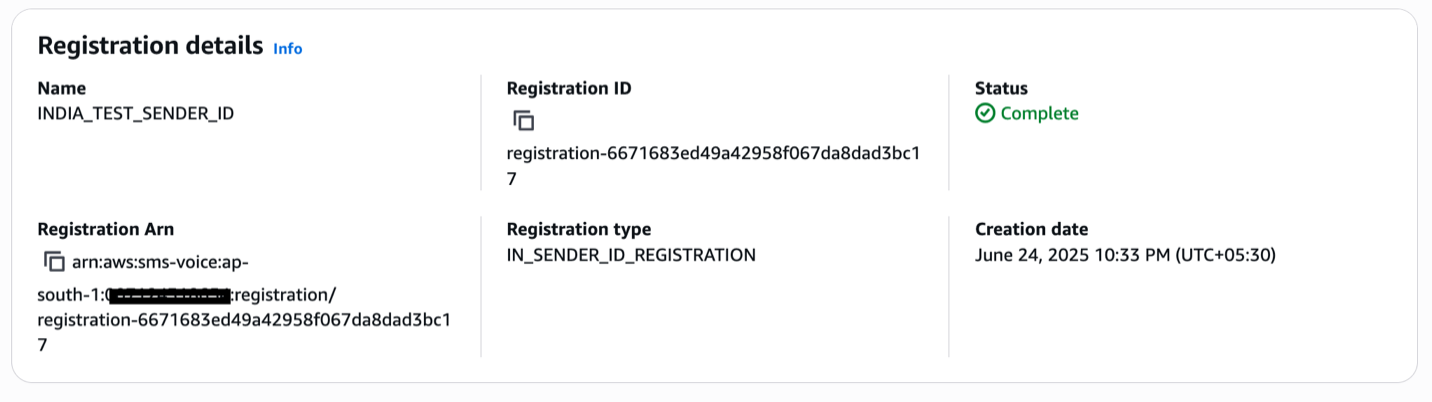
Sau khi gửi, bạn có thể theo dõi trạng thái đăng ký. Khi được phê duyệt, trạng thái sẽ hiển thị là Complete, như trong ảnh chụp màn hình sau.
Ảnh chụp màn hình sau cho thấy đăng ký yêu cầu cập nhật trước khi có thể được phê duyệt.
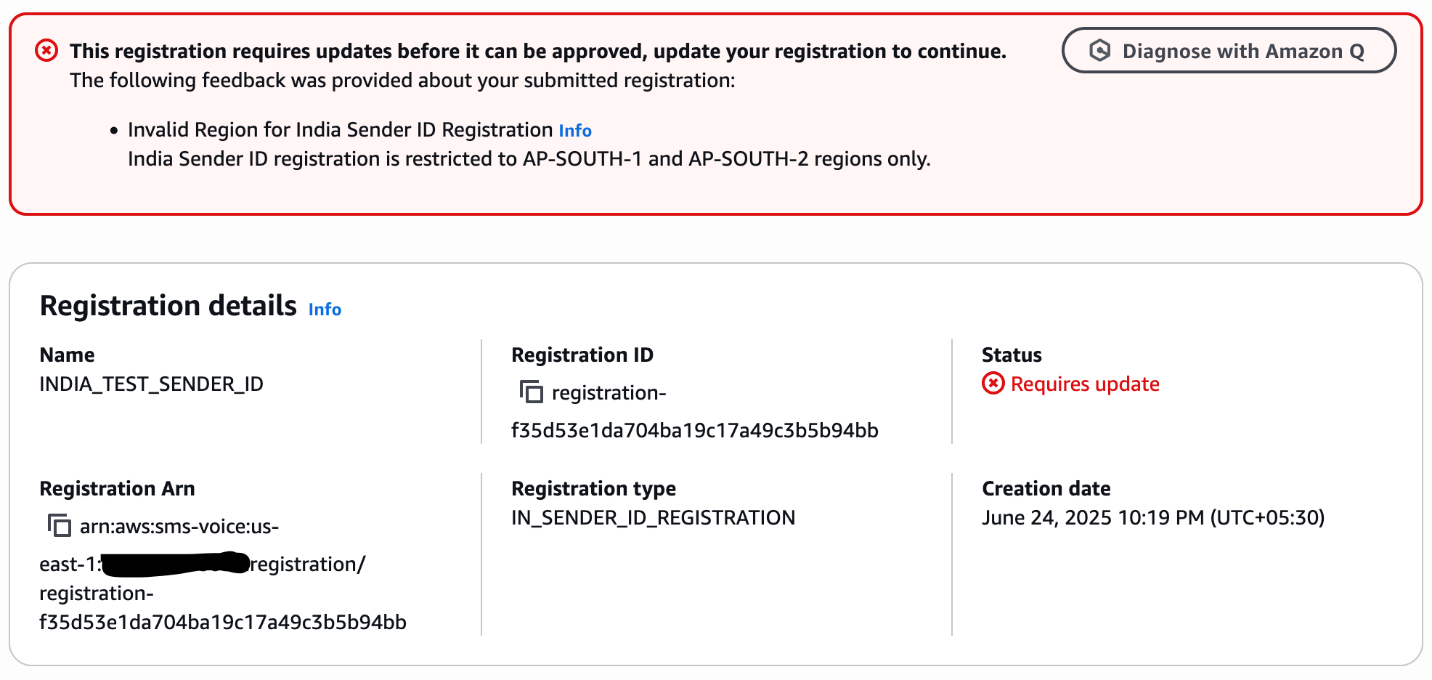
Lỗi xảy ra vì mã đăng ký được chạy trong một Region khác ngoài AP-SOUTH-1 hoặc AP-SOUTH-2. Để giải quyết vấn đề này, hãy xóa đăng ký hiện tại và chạy lại quy trình trong một trong các Region được hỗ trợ.
Như đã đề cập trước đó, DescribeRegistrationFieldDefinitions khác nhau tùy theo quốc gia, vì mỗi quốc gia có các yêu cầu đăng ký và thông số kỹ thuật trường riêng. Bạn phải sửa đổi tập lệnh này theo các yêu cầu cụ thể của quốc gia mục tiêu. Tham khảo tài liệu API để biết các loại đăng ký và định nghĩa trường cụ thể của quốc gia.
Kiểm tra trạng thái đăng ký
Kiểm tra trạng thái đăng ký của bạn bằng cách sử dụng bảng điều khiển AWS End User Messaging hoặc API DescribeRegistrations. Để sử dụng bảng điều khiển, hãy chọn Registrations trong Configurations trong ngăn điều hướng.
Trạng thái đăng ký cho mỗi yêu cầu ban đầu sẽ hiển thị CREATED và sẽ thay đổi thành REVIEWING trong vòng 24 giờ sau khi gửi. Để biết thêm thông tin về trạng thái đăng ký, hãy tham khảo Kiểm tra trạng thái đăng ký trong AWS End User Messaging SMS. Nếu trạng thái đăng ký của bạn hiển thị REQUIRES_UPDATES, đăng ký cần thêm thông tin. Bạn có thể chỉnh sửa và gửi lại yêu cầu với thông tin cần thiết.
Như đã lưu ý trước đó, các nhà xem xét bên thứ ba đánh giá các đăng ký. Hãy đợi 2-4 tuần để được phê duyệt và lâu hơn đối với ID người gửi ở một số quốc gia.
Đăng ký chương trình SMS cho ISV
Các nhà cung cấp phần mềm độc lập (ISV) được định vị giữa AWS End User Messaging và khách hàng doanh nghiệp cuối của ISV. Mặc dù họ có thể hoạt động khác nhau hoặc cung cấp các dịch vụ khác nhau, nhưng các yêu cầu của họ đối với đăng ký chương trình SMS phần lớn là giống nhau. Doanh nghiệp cuối (End business) đề cập đến khách hàng ISV của bạn. Đây thường là thực thể tạo nội dung tin nhắn, phân phối nó thông qua nền tảng của bạn và tương tác với người dùng cuối của họ (người nhận tin nhắn).
Đăng ký chương trình SMS yêu cầu thông tin doanh nghiệp của người dùng cuối, không phải thông tin ISV. Điều này có nghĩa là ISV phải cung cấp một cơ chế để các doanh nghiệp cuối của họ cung cấp thông tin của họ để gửi đăng ký. ISV và các nhà tổng hợp phải cung cấp thông tin đại diện cho thực thể khách hàng gửi tin nhắn cho những người nhận đã chọn tham gia. Amazon sử dụng thông tin này theo tất cả các nghĩa vụ hiện hành và để xác minh người dùng cuối là một doanh nghiệp hợp pháp. Amazon sẽ không liên hệ với người dùng cuối bằng thông tin được cung cấp.
Kết luận
Trong bài viết này, chúng tôi đã trình bày cách tự động hóa quy trình đăng ký ID người gửi bằng cách sử dụng các tập lệnh Python và API của AWS End User Messaging. Sử dụng các API này có thể cải thiện đáng kể hiệu quả và giảm lỗi thủ công. Để được hướng dẫn thêm, hãy tham khảo tự động hóa đăng ký số điện thoại miễn phí của AWS End User Messaging US, Tự động hóa đăng ký số điện thoại miễn phí của AWS End User Messaging US, Cách đăng ký ID người gửi bằng API với AWS End User Messaging, và Tài liệu tham khảo API AWS End User Messaging V2.
Về tác giả

Sarath Kumar Kallayil Sreedharan
Sarath Kumar K.S. là Quản lý tài khoản kỹ thuật cấp cao tại Amazon Web Services. Sarath làm việc với các khách hàng doanh nghiệp để giúp họ kiến trúc và xây dựng các giải pháp có độ tin cậy cao và hiệu quả về chi phí trên AWS. Anh chuyên về các công nghệ serverless, nhắn tin và các dịch vụ Generative AI, đồng thời có kinh nghiệm trong phát triển và kiến trúc ứng dụng. Trong thời gian rảnh rỗi, anh thích đọc sách, đi du lịch, chơi cricket và dành thời gian cho gia đình.

Bruno Giorgini
Bruno Giorgini là Kiến trúc sư giải pháp cấp cao chuyên về Dịch vụ nhà phát triển truyền thông của AWS. Khi không bận rộn tạo ra các giải pháp sáng tạo cho khách hàng, Bruno thích dành thời gian chất lượng bên gia đình, khám phá những con đường mòn đi bộ đường dài tuyệt đẹp. Niềm đam mê công nghệ và tiềm năng của nó trong việc thúc đẩy chuyển đổi kinh doanh giúp anh luôn có động lực để cung cấp các giải pháp có tác động cho các tổ chức trên toàn thế giới.

Nideesh K T
Nideesh là một chuyên gia CNTT giàu kinh nghiệm với chuyên môn về điện toán đám mây và hỗ trợ kỹ thuật. Nideesh đã làm việc trong ngành công nghệ được 9 năm. Trong vai trò hiện tại là Quản lý tài khoản kỹ thuật cấp cao, Nideesh cung cấp hỗ trợ kỹ thuật và kiến trúc các ứng dụng đám mây cho khách hàng doanh nghiệp. Ngoài công việc, Nideesh thích duy trì hoạt động bằng cách đến phòng tập thể dục, chơi thể thao và dành thời gian ngoài trời.
 AWS Study Group